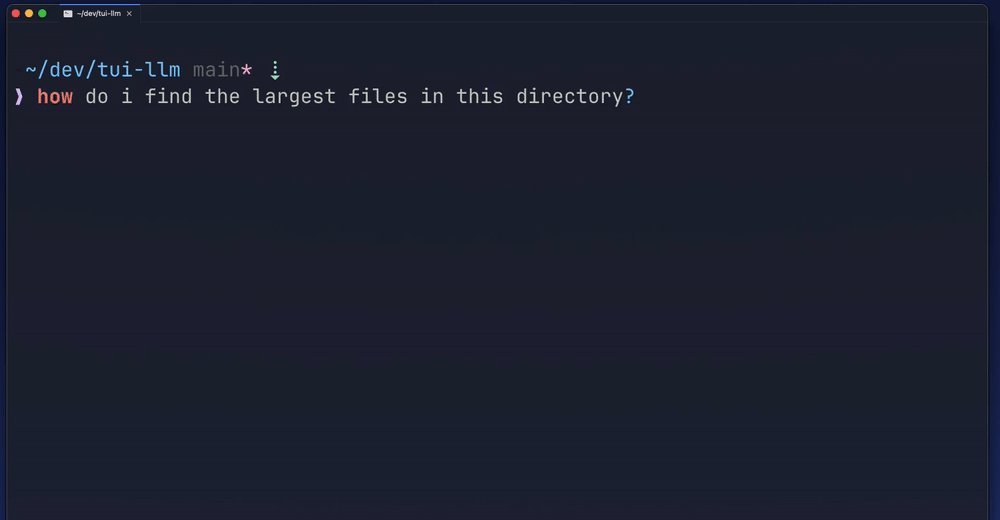
Intent
Say what you want.
Type the task in plain language at your normal prompt, then press ??.
Zsh · Homebrew · npm · Zellij
QueQue turns plain-language intent into shell commands without leaving your prompt. Pick a suggestion and it lands in your buffer with a short explanation, ready to tweak and run.
Built for people who live in the terminal but don’t keep every flag in their head.
brew install k-leumas/tap/quequeStays in the terminal
The old loop was search, copy, paste, tweak, and hope. QueQue collapses it into your prompt.
Type what you want to do, the way you would say it, and add ?? at the end.
A selection opens in the terminal. Use the arrow keys or fuzzy search, then press Enter.
The command lands in your buffer. QueQue never runs anything for you.
In use
Frames from the demo recording, one real request from start to finish.
Intent
Type the task in plain language at your normal prompt, then press ??.
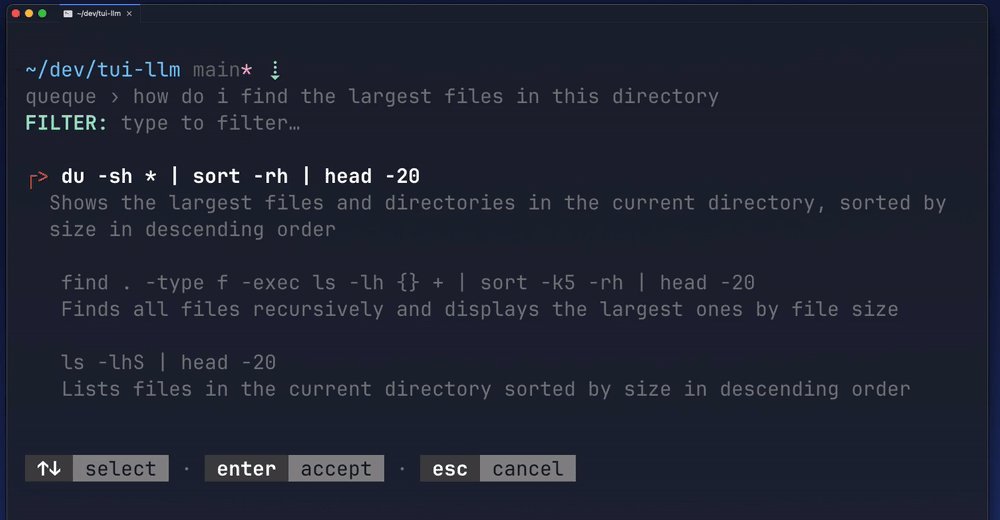
Choose
Each suggestion comes with a one-line explanation, so you can pick the right one without looking anything up.
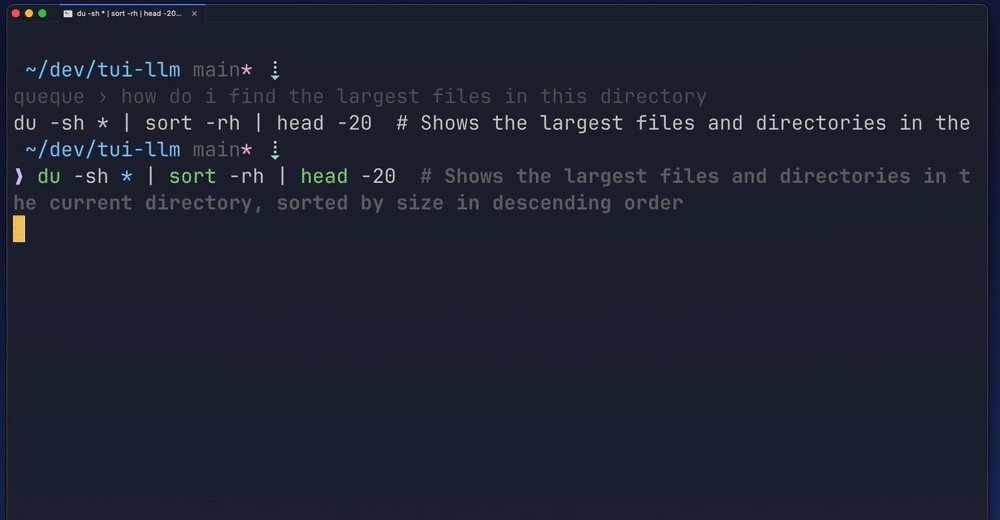
Review
The chosen command sits in your buffer with a comment explaining what it does.
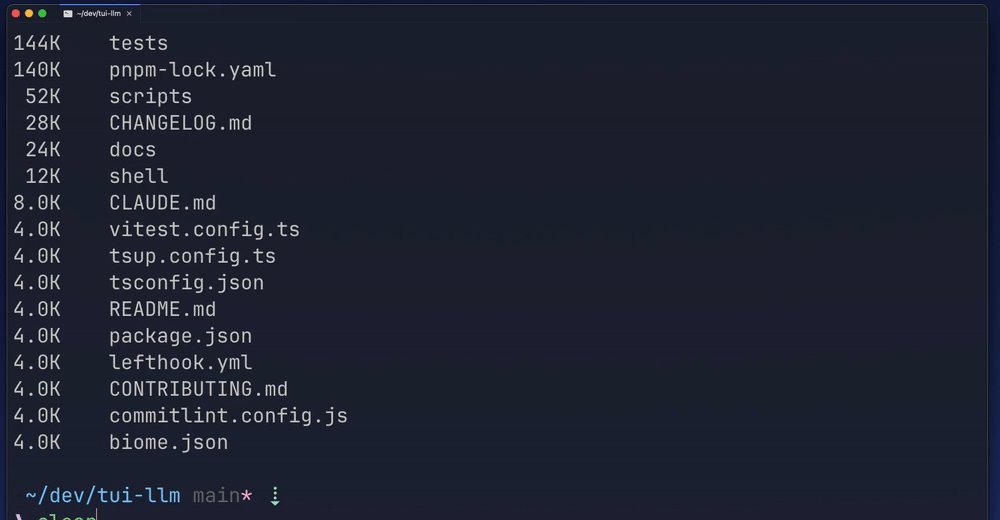
Run
It is an ordinary command in your history, with the explanation alongside it.
The problem
Most of us know what we want the terminal to do. What we don’t remember is whether it’s -rh or -hr, which flag keeps the changes, or how that find syntax goes.
So we leave the terminal, search, skim a few answers, copy one, paste it, fix it, and hope. It works, but it breaks your focus every time.
QueQue brings the answer to the prompt, and leaves the decision with you.
Before: search, copy, paste, tweak, pray. Now: type your intent and press ??.
Standout feature
QueQue is insertion-only. It writes commands into your buffer and never runs them.
Anything AI-generated that touches your system should get a look before it runs. QueQue is built around that: every suggestion lands where you can read it, edit it or throw it away.
It is careful about what it sends, too. Only your request, your working directory and git metadata such as the branch and changed file names leave your machine. File contents never do.
Features
Works at your normal prompt. Esc cancels and puts you back where you were typing.
Arrow keys or type to filter the suggestions, then Enter to accept.
Each command arrives with a comment saying what it does.
Opens in a floating pane inside Zellij, and inline everywhere else.
Uses Claude with your Anthropic API key, from your shell or a project’s .env.local.
Sensitive paths are stripped, debug logs are off and redacted, and bad config fails closed.
Who it’s for
Developers
Get the git, find or docker incantation without switching to a browser tab.
Ops and infrastructure
Suggestions never run on their own, and risky commands come with a warning.
Occasional terminal users
Every command explains itself, so the next time you might not need to ask.
Zellij users
Same trigger, same result, in a floating pane that fits your layout.
How it works
brew install k-leumas/tap/queque, or npm install -g @k-leumas/queque-cli.
Run qq init zsh >> ~/.zshrc and reload your shell.
Set ANTHROPIC_API_KEY in your environment or a .env.local file.
Type what you want, add ??, pick a command, and press Enter when it looks right.
Why QueQue stands out
Searching the web works but pulls you out of the terminal. Tools that run commands for you are quick, but ask for a lot of trust.
QueQue sits in between: the speed of asking, with the command in front of you before anything happens.
FAQ
A Zsh tool that turns plain-language intent into shell commands. Type what you want, press ??, and pick a suggestion. It lands in your buffer, ready to run or edit.
No. QueQue only inserts commands into your buffer. You press Enter yourself.
Your request, your current directory, git metadata such as the branch and changed file names, and file names mentioned in your request. Never file contents. Paths that match sensitive patterns, like .env files, credentials and keys, are removed first.
Claude, with your own Anthropic API key. QueQue reads ANTHROPIC_API_KEY from your environment, or from a .env.local file in your project or any parent folder.
Zsh. Inside Zellij it opens in a floating pane; otherwise it runs inline in your terminal.
With Homebrew: brew install k-leumas/tap/queque. Or with npm: npm install -g @k-leumas/queque-cli, which also needs Node.js 20 or newer and jq. Then run qq init zsh >> ~/.zshrc and reload.
Yes. Press Esc to cancel and you are back where you were typing. Adjust the request and press ?? again.
Get QueQue
Install QueQue, wire up the ?? trigger, and ask for the next command you would have searched for.
brew install k-leumas/tap/quequeZsh · Homebrew and npm · Insertion-only
Built by K-leumas
I designed and built QueQue end to end. If you have a system that people find hard to work with, I can help you put a clear, careful interface in front of it.