Marking
Save the paragraph that matters.
The handle appears as you hover. A click saves that block, whether it is a paragraph, a list, a heading or a quote.
 Etch
EtchChrome · Firefox · Browser extension
Etch adds bookmarks to ChatGPT, Claude, Gemini and other AI chat apps. Save the paragraph, list, heading or quote that mattered, then return to that exact spot with one click. Your bookmarks stay in your browser.
Built for people who do real work in long AI conversations and hate scrolling to find the good part.
A small, focused tool
No account, no setup and no new app to learn. Etch lives in the margin of the chat you already use.
Hover a reply and click the handle in the margin. There is no title, tag or folder to fill in.
Every bookmark knows where it came from. One click scrolls the page to the exact paragraph.
Bookmarks are stored locally in your browser and never synced to a server. There is nothing to sign up for.
In use
Recorded in real conversations: marking a reply, finding it again, and getting back to it.
Marking
The handle appears as you hover. A click saves that block, whether it is a paragraph, a list, a heading or a quote.
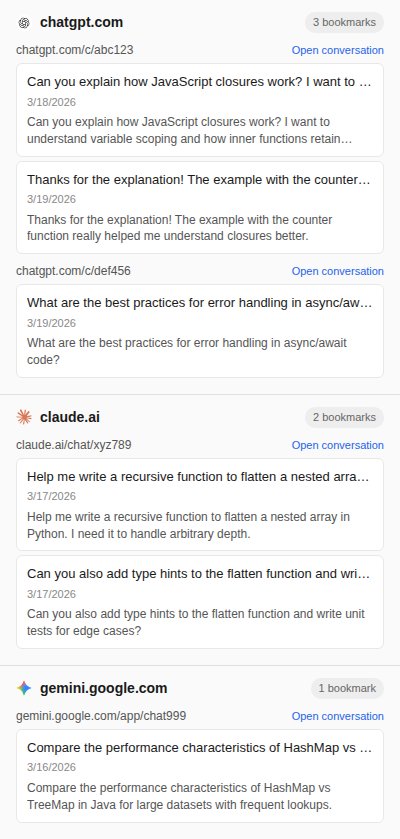
Collections
See what you saved across ChatGPT, Claude, Gemini and the rest, with a link to open each conversation.
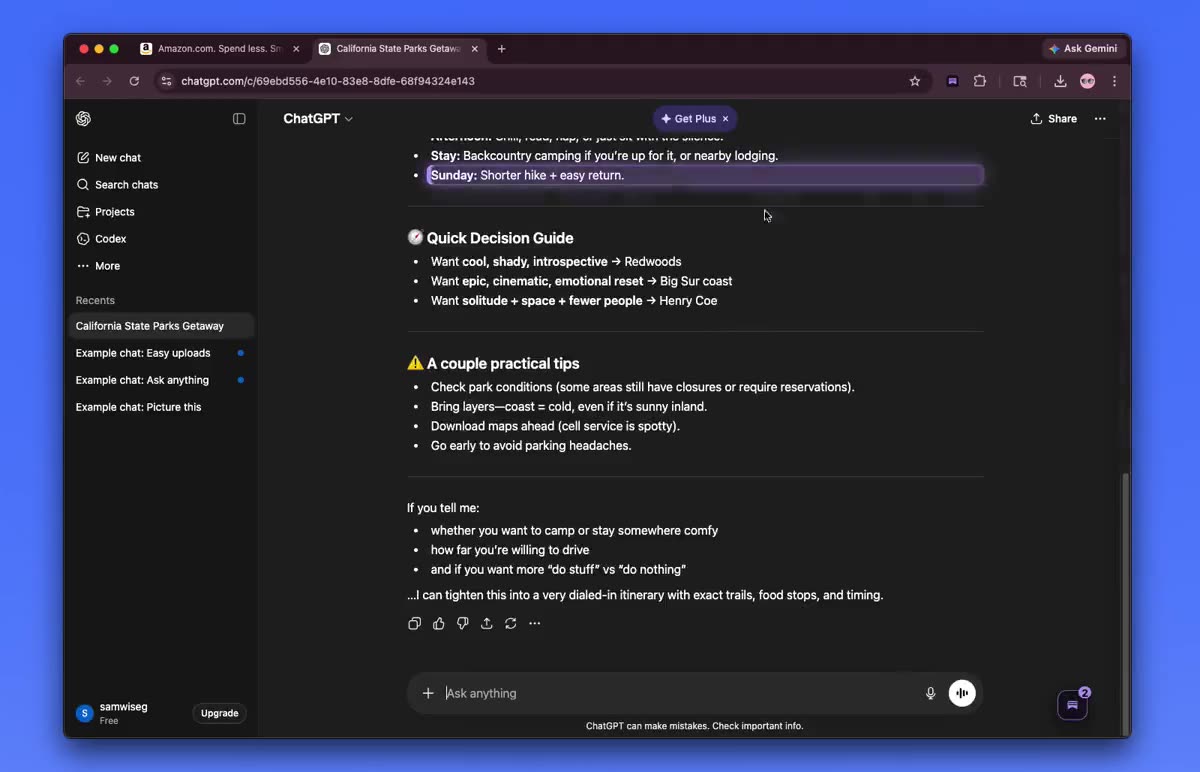
Back in context
After a jump, the saved block is outlined so your eye finds it at once, with the rest of the conversation around it.
The problem
A long conversation might hold one paragraph you will want next week: the command that finally worked, the wording you liked, the explanation that made it click.
Chat history finds the conversation, not the paragraph. Copying into a notes app keeps the text but loses the context around it. So you scroll, and scroll, and sometimes give up and ask again.
Etch keeps a pointer to the moment itself, so getting back to it takes one click instead of a search.
Keep all the good parts of every AI chat.
Standout feature
Most ways of saving AI output keep a copy. Etch keeps the place.
Click jump in the side panel, or pick a bookmark from the toolbar popup, and the page scrolls to the block you saved, with the conversation around it intact.
That matters because the value of an answer is often in what came before it: the question, the constraint you added, the follow-up.
Features
A handle in the margin saves any paragraph, list, heading or quote.
Every bookmark scrolls you back to the exact block it came from.
Review the bookmarks for the current conversation without leaving it.
Reach any saved bookmark from anywhere in the browser.
Supports 7+ AI chat surfaces, including ChatGPT, Claude, Gemini, Grok, Copilot and Perplexity.
Bookmarks stay in your browser. No account and no sync.
Who it’s for
Developers
Mark the working command or code block and come back to it with the discussion that led there.
Researchers and students
Save the explanations and sources worth revisiting instead of re-asking the same question later.
Writers
Drafting with AI produces a lot of near-misses. Bookmark the good lines as they appear.
Multi-assistant users
The same handle and the same panel whether you are in ChatGPT, Claude, Gemini or another assistant.
How it works
Add Etch from the Chrome Web Store or Firefox Add-ons.
Open ChatGPT, Claude, Gemini or another supported assistant.
Hover a reply and click the handle in the margin.
Open the side panel or the toolbar popup and click jump.
Why Etch stands out
The usual ways of keeping AI output either save a copy with no context or make you search for the whole conversation again.
Etch also reads the page by its layout rather than by the class names these apps use, so the frequent redesigns of AI chat interfaces are far less likely to break it.
FAQ
A lightweight browser extension for Chrome and Firefox that lets you bookmark any paragraph, heading, list or quote inside an AI conversation and jump back to it.
7 or more chat surfaces, including ChatGPT, Claude, Gemini, Grok, Copilot and Perplexity. A few newer ones are in beta.
No. There is no sign-up and no sync. Bookmarks are stored locally in your browser.
Each conversation keeps its own bookmarks in the side panel. The toolbar popup and collections view let you reach all of them.
Your bookmarks stay in your browser. Etch sends anonymous usage events, such as a bookmark being created, but never bookmark content, conversation text or page URLs. The privacy policy lists every event.
A local companion app that keeps bookmarks in a database on your machine, and a read-only connector so your own AI tools can use them.
Get Etch
Etch is available for Chrome and Firefox. Install it, mark one useful reply today, and see how often you jump back.
Chrome · Firefox · Stored locally
Built by K-leumas
I designed and built Etch end to end. If you have a system that people find hard to work with, I can help you put a clear, careful interface in front of it.